
When it comes to embroidery, whether for personal projects or professional production, understanding file formats is crucial. Two of the most common file types in the embroidery world are the dst file for embroidery and the pes file for embroidery. These files act as blueprints for embroidery machines, guiding every stitch, pattern, and detail. In this guide, we’ll explore everything about these two formats, their differences, how they are created, and how to use them for flawless embroidery results.
What Is a DST File for Embroidery?
A dst file for embroidery is one of the most widely used file formats in professional embroidery. Originally developed by Tajima, this file type contains instructions that embroidery machines use to stitch designs accurately onto fabric. Unlike images or graphics files, a DST file doesn’t store colors or visual details; it only stores stitch information.
Key Components of a DST File:
Stitch Coordinates: The exact position where each stitch should go.
Stitch Direction: The path the needle will follow.
Jump Stitches: Points where the machine moves without stitching.
Trim Commands: Instructions for cutting threads during multi-color designs.
Color Change Instructions: Indicating when a different thread color is needed.
The DST file format is ideal for large-scale production because it focuses on efficiency and precision. Machines that read DST files can stitch complex designs quickly, reducing errors like skipped stitches or thread breaks.
What Is a PES File for Embroidery?
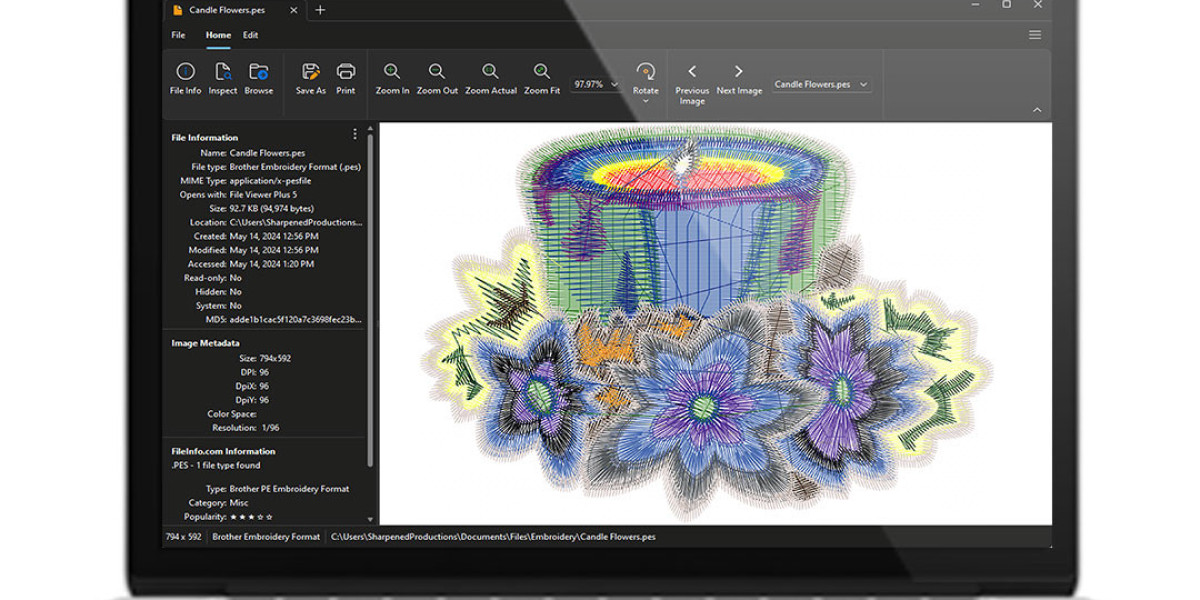
A pes file for embroidery is another popular format, mainly used with Brother and Baby Lock machines. Unlike DST files, PES files often contain color information, allowing the design to be previewed in software before stitching. This makes PES files particularly useful for hobbyists or small businesses that need to visualize the final product.
Key Features of PES Files:
Supports thread color information, which helps in color matching.
Compatible with home machines like Brother, Baby Lock, and certain commercial machines.
Useful for small-scale embroidery or projects where color accuracy is important.
While PES files are user-friendly and offer color previews, they may not be as universally compatible as DST files for commercial production.
DST vs PES: Understanding the Differences
It’s important to know the differences between a dst file for embroidery and a pes file for embroidery to choose the right file for your machine or project.
| Feature | DST File | PES File |
|---|---|---|
| Machine Compatibility | Most commercial machines | Brother, Baby Lock, some others |
| Color Information | No | Yes |
| Focus | Stitch paths and production | Stitch paths with color preview |
| Ideal Use | Large-scale or commercial production | Home embroidery and small-scale production |
Understanding these differences ensures that your embroidery machine reads the file correctly, and the design comes out exactly as intended.
How DST and PES Files Are Created
Both DST and PES files are created through embroidery digitizing, which is the process of converting artwork, logos, or designs into stitch instructions. This is a crucial step because poorly digitized files can cause problems like thread breaking, skipped stitches, or uneven embroidery.
Steps in Creating DST and PES Files:
Artwork Preparation:
The first step is to have a clean, high-resolution design or logo. This is important because the digitizer will use this artwork as a guide for creating the stitch file.Digitizing the Design:
Using professional embroidery software, the digitizer converts the artwork into stitch patterns. This involves selecting stitch types, directions, and underlay to ensure the design is machine-ready.Adjusting Stitch Settings:
Stitch density, length, and direction are adjusted to match the fabric and design complexity. This helps reduce issues like puckering, thread breaking, or uneven stitching.Exporting the File:
Once the design is ready, it is exported as a dst file for embroidery or pes file for embroidery depending on the machine compatibility and project needs.Test Stitching:
A sample stitch is run to ensure that the design comes out correctly on the intended fabric. Adjustments are made if needed to optimize the stitch path.
Why DST Files Are Preferred for Commercial Production
DST files are often considered the gold standard in commercial embroidery. Here’s why:
Machine Compatibility: Almost all commercial embroidery machines can read DST files.
Production Efficiency: DST files focus purely on stitch paths, making them faster to run on machines.
Reduced Thread Breaks: With optimized stitch paths, DST files help minimize errors during long production runs.
Consistency: Designs remain consistent even when stitched repeatedly on different garments.
If your goal is high-volume production, DST files are often the best choice.
Why PES Files Are Ideal for Home Embroidery
For hobbyists or small businesses, PES files offer several advantages:
Color Previews: PES files often include color information, making it easy to visualize the final design before stitching.
Ease of Use: Compatible with home machines and beginner-friendly software.
Flexibility: PES files allow designers to make small adjustments without affecting production efficiency.
However, PES files may require conversion if you want to use them on machines that do not support this format.
Tips for Using DST and PES Files
Even with high-quality files, embroidery can run into common issues like thread breaking or uneven stitching. Here are some tips to get the best results:
Use High-Quality Thread: Cheap threads are more likely to break or fray during stitching.
Check Needle Condition: Replace needles regularly to prevent skipped stitches or tearing.
Maintain Proper Tension: Adjust your machine’s thread tension according to fabric and thread type.
Test Stitch First: Always stitch a small sample to check for any adjustments needed.
Work with Skilled Digitizers: Professional digitizers optimize stitch paths and file formats to prevent errors.
Following these tips will ensure smooth stitching and reduce frustration during embroidery projects.
Common Applications of DST and PES Files
Both dst file for embroidery and pes file for embroidery are widely used across industries. Common applications include:
Corporate Logo Embroidery: Perfect for uniforms, jackets, and branded merchandise.
Sports Team Apparel: Caps, jerseys, and jackets for consistent and professional embroidery.
Promotional Products: Bags, hats, and apparel for giveaways or marketing campaigns.
Custom Patches: High-quality patches for clubs, schools, or organizations.
Home Projects: Personalized gifts, decorative designs, and DIY embroidery projects.
Using the right file type ensures consistency, accurate color, and professional results across all these applications.
How Professional Digitizing Improves Results
The quality of your dst file for embroidery or pes file for embroidery largely depends on the digitizer’s skill. Professional digitizers know how to:
Optimize stitch density and direction for smooth stitching
Select the right file format for the machine and project
Minimize thread breaking and skipped stitches
Maintain design proportions and details even at small sizes
Professional digitizing ensures that your embroidery looks as close as possible to the original artwork, while saving time and reducing wasted materials.
Choosing Between DST and PES Files
Deciding between a dst file for embroidery and a pes file for embroidery depends on your needs:
For commercial machines and large-scale production, choose DST files.
For home embroidery, small businesses, or color-accurate projects, PES files are more suitable.
Sometimes, businesses use both file types depending on different machines in their workshop. Converting files is also possible using digitizing software, but starting with the right format saves time and prevents errors.
Conclusion
Understanding the differences between dst file for embroidery and pes file for embroidery is critical for anyone in the embroidery industry. DST files excel in commercial production with machine compatibility and efficient stitching, while PES files provide color previews and user-friendly options for home embroidery.
By using professional digitizers and following best practices, you can prevent common issues like thread breaking, skipped stitches, or uneven embroidery. Whether you are running a large embroidery business or creating personal projects, knowing how to use DST and PES files effectively will help you achieve precise, vibrant, and professional embroidery results every time.